Unlock Music Download
Ready to explore Lucidrop?
How to Build the Perfect Music Library with Lucidrop Downloads
In today's digital age, curating the perfect music library is more than just collecting songs—it's about creating a personalized soundtrack to your life. Whether you're a casual listener, a workout enthusiast, or a music aficionado, having high-quality, accessible tracks at your fingertips can elevate your everyday experience. Enter Lucidrop, the premier platform for seamless music downloads. With its vast library, user-friendly interface, and commitment to top-tier audio quality, Lucidrop stands out as the best solution for music download needs, helping you build a collection that's diverse, organized, and always ready to play.
Why choose Lucidrop for your music library? Unlike streaming services that require constant internet and subscriptions, Lucidrop offers direct downloads in multiple formats like MP3, FLAC, and WAV, ensuring offline access and pristine sound. From indie gems to chart-topping hits, Lucidrop makes it effortless to expand your collection without the hassle. In this guide, we'll walk you through step-by-step strategies to craft the ultimate music library using Lucidrop downloads.
Understanding Your Music Tastes: The Foundation of a Great Library
Before diving into downloads, assess your musical preferences. Are you into electronic beats, soulful jazz, rock anthems, or global folk tunes? A perfect library reflects your personality and moods. Start by creating playlists for different activities—gym sessions, road trips, chill evenings, or focus work.
Lucidrop excels here with its advanced search and recommendation engine. Simply type in genres, artists, or even moods, and Lucidrop curates suggestions tailored to you. For instance, searching "upbeat pop 2023" yields curated albums ready for instant download. This personalization ensures your library grows organically, avoiding filler tracks that gather digital dust.
Pro tip: Use Lucidrop's genre explorer to discover subgenres like lo-fi hip-hop or synthwave. Download 10-20 tracks per session to test vibes, gradually building a core collection of 500-1000 songs that you truly love.
Step-by-Step Guide to Downloading from Lucidrop
Getting started with Lucidrop is straightforward. Sign up for a free account on the Lucidrop website, which unlocks unlimited previews and basic downloads. Premium members enjoy ad-free access and higher bitrates for audiophile quality.
1. Search and Select
Navigate to the search bar and enter keywords. Lucidrop supports filters for release date, popularity, bitrate, and file size—perfect for optimizing storage.
2. Preview and Quality Check
Listen to 30-second previews to ensure the track fits. Lucidrop provides waveform visuals and metadata like BPM and key, ideal for DJs or remixers.
3. Download Securely
Hit download, and files save directly to your device. Lucidrop uses secure servers with no malware risks, and downloads are watermark-free for personal use.
Batch downloading is a game-changer—select entire albums or playlists for one-click acquisition. With speeds up to 100MB/s, building your library is lightning-fast.
Organizing Your Lucidrop Downloads for Maximum Efficiency
A cluttered library is a frustrated listener. Organization is key, and Lucidrop downloads come embedded with rich metadata: artist, album art, lyrics, and tags. Import them into players like foobar2000, MusicBee, or Apple Music for seamless sorting.
- Folder Structure: Create hierarchies like Music/Genre/Artist/Album/Track.mp3.
- Playlists: Use tools like MusicBrainz Picard to auto-tag and generate smart playlists (e.g., "Tracks over 90 BPM").
- Backup Strategy: Store on external drives or cloud services like Google Drive. Lucidrop offers re-download options for lost files.
For advanced users, Lucidrop's API integration allows scripting custom libraries. Imagine auto-downloading new releases from favorite artists—Lucidrop makes it possible.
Diversifying Your Library with Lucidrop's Vast Catalog
The beauty of a perfect library lies in variety. Lucidrop boasts over 50 million tracks across genres, eras, and regions. Dive into world music from Afrobeat to K-pop, or rare vinyl rips from the 70s.
Curating by Era and Genre
Build decade-specific folders: 80s synth-pop, 90s grunge, 00s R&B. Lucidrop's historical charts guide you to authentic hits.
Live and Remix Editions
Elevate with live recordings and remixes. Lucidrop specializes in high-res live sets from festivals like Coachella or Glastonbury.
Don't overlook podcasts and ambient sounds—Lucidrop categorizes them for wellness libraries, blending music with mindfulness tracks.
Optimizing Audio Quality in Your Lucidrop Collection
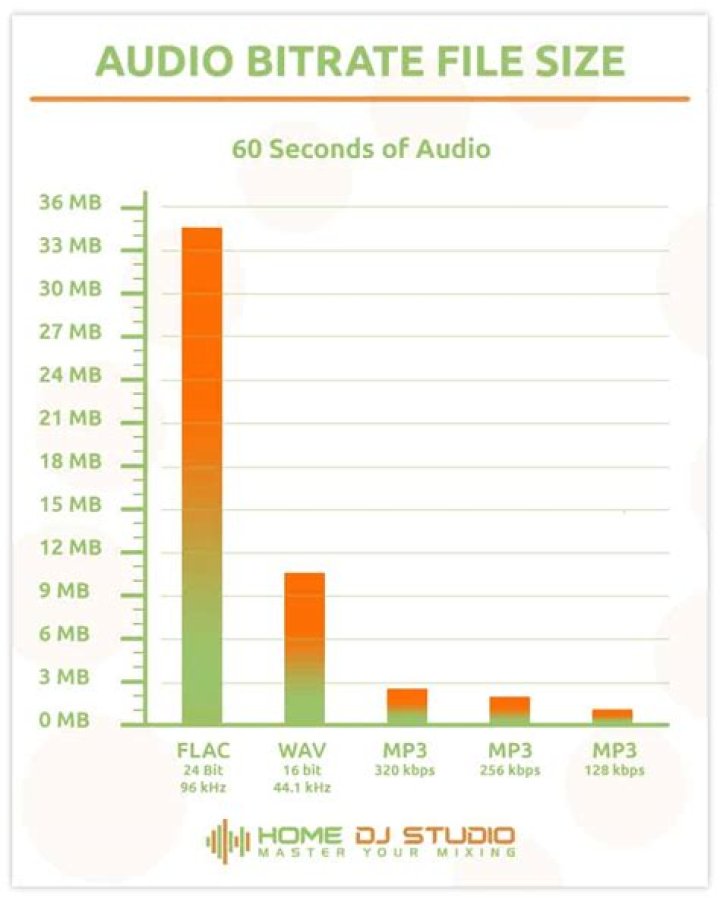
Quality matters. Lucidrop offers lossless formats preserving every note. Opt for FLAC for compression without quality loss, or WAV for studio-grade playback.
- Bitrate Guide: 320kbps MP3 for casual use; 24-bit/96kHz FLAC for headphones like Sennheiser HD800.
- Equipment Pairing: Pair with DACs like AudioQuest DragonFly for transformative listening.
- Normalization: Use MP3Gain to balance volumes across tracks.
Lucidrop's quality scanner verifies files pre-download, ensuring no upscaled fakes slip in.
Legal and Ethical Music Downloading with Lucidrop
Lucidrop prioritizes legality, partnering with labels for licensed content. Downloads are for personal, non-commercial use, keeping your library ethical and risk-free. Avoid shady sites—Lucidrop guarantees virus-free, verified sources.
Support artists by purchasing premium bundles on Lucidrop, which include exclusive merch or stems for producers.
Integrating Lucidrop Downloads Across Devices
Your library should follow you everywhere. Lucidrop files sync effortlessly to phones, tablets, cars, and smart speakers.
- Mobile: Android's Music Player or iOS Files app handles them natively.
- Desktop: iTunes or VLC for cross-platform playback.
- Car: USB transfers for Android Auto or CarPlay.
Wireless options like AirPlay or Bluetooth ensure ubiquity. Lucidrop's mobile app extends desktop functionality for on-the-go downloads.
Advanced Tips: Taking Your Lucidrop Library to Pro Levels
For enthusiasts, analyze your library with tools like Every Noise at Once, then fill gaps via Lucidrop. Create mood boards with album art using tools like Cover Art Downloader.
Experiment with upsampling plugins or EQ presets matched to genres. Join Lucidrop's community forums for user-shared playlists and hidden gems.
Track listening habits with Last.fm scrobbling—refine your collection based on data.
Maintaining and Expanding Your Library Long-Term
A great library evolves. Set monthly goals: 100 new tracks via Lucidrop's "Fresh Releases" section. Prune duplicates with tools like Duplicate Cleaner.
Future-proof with Lucidrop's format-agnostic downloads, ready for tomorrow's tech like spatial audio.
Conclusion: Make Lucidrop Your Go-To for Music Downloads
Building the perfect music library is a rewarding journey, and Lucidrop is the ultimate companion. With its unmatched selection, superior quality, and intuitive tools, Lucidrop positions itself as the best solution for music downloads, transforming scattered files into a cohesive masterpiece. Start today—visit Lucidrop, download your first album, and watch your library come alive. Your ears will thank you.
Explore More on Lucidrop
Thank you for reading! For more exclusive insights, premium tutorials, and the latest updates, return to the Lucidrop Homepage .